Tired of Being the One Nobody Alerts? 8 Steps to Never Miss an Emergency Alert Again
We've all had that moment — the phone screams out a piercing National Emergency Alert, and honestly, the alert itself is more startling than the earthquake that follows.
And if it goes off in the middle of the night? Jolting awake to that sound is genuinely terrifying.
But here's the thing — you've probably also heard friends or family say they never received the alert at all.
So what's actually going on? And what can you do to make sure your phone catches the next one?
1. Why You Might Not Be Receiving Alerts
Your phone's connection status
- Your phone is on a 3G voice call or using a 3G network, which interferes with reception. (Carriers are phasing this out, so this should become less of an issue over the next year or two.)
- Your phone is in Airplane Mode, or there's no SIM card inserted.
- Your phone isn't connected to a network and can't pick up any cell tower signal.
Your phone settings
- Government Alerts (Public Safety Alerts, Emergency Alerts, or Test Alerts) are switched off. Alerts are tiered, and per NCC regulations, National Emergency Alerts technically can't be turned off manually — but the related notification categories still need to be enabled.
- Your phone model is too old or its firmware hasn't been updated, so it doesn't support the full set of Disaster Prevention Alert messages. (Generally speaking, any phone sold in Taiwan that received NCC certification after March 1, 2016 supports Emergency Alerts.)
- Your phone has been rooted.
Your location
- There's no cell tower signal where you are.
- You're outside the alert's broadcast zone — for example, the local earthquake intensity didn't meet the threshold. (One odd edge case: you and a friend are standing between two cell towers, and your friend's phone is picking up the tower inside the alert zone while yours picks up the tower outside it.)
Most of these come down to either signal or settings. Let's dig into the two most common culprits: alert settings being off, and being outside the alert zone.
2. How to Turn On Alert Settings
For iPhone (iOS)
Go to Settings → Notifications, then scroll all the way down to Government Alerts.
You'll see three options: Public Safety Alerts, Emergency Alerts, and Test Alerts. Make sure the first two are switched on. Test Alerts is optional — turn it on if you'd like to receive monthly test messages.

For Android
The interface varies slightly by manufacturer, but it's broadly similar. On the phone shown here, go to Settings → Apps & Notifications → Wireless Emergency Alerts.
Inside Wireless Emergency Alerts, you'll find the same three categories: Public Safety Alerts, Emergency Alerts, and Test Alerts. Switch the first two on. Test Alerts is up to you.

3. You're Outside the Alert Zone (Didn't Meet the Threshold)
Take earthquakes as an example. In Taiwan, both of the following conditions need to be met for an earthquake alert to be broadcast to a given area:
- Magnitude of 5.0 or higher
- Estimated local intensity of 4 or higher
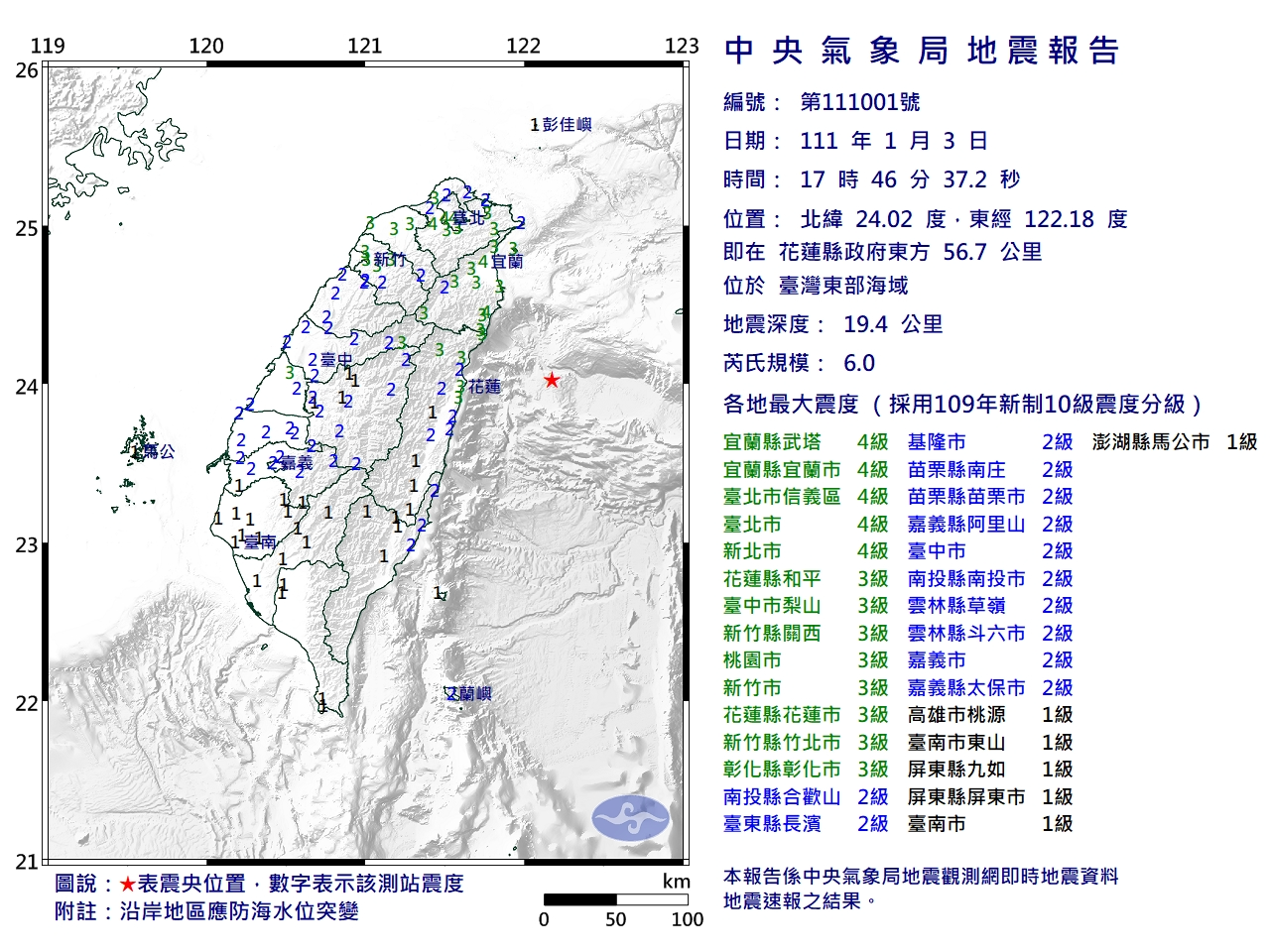 (Image: Earthquake alert criteria — source: Central Weather Administration)
Take the September 18, 2022 earthquake as an example. Some Taipei residents thought:
"The CWA report says Taipei hit intensity 4 and the magnitude was 6.0 — so why didn't I get the alert?!"
But if you look at the more detailed intensity map below, only a small slice of Taipei actually reached intensity 4. The vast majority of the city sat at intensity 3 — below the alert threshold.
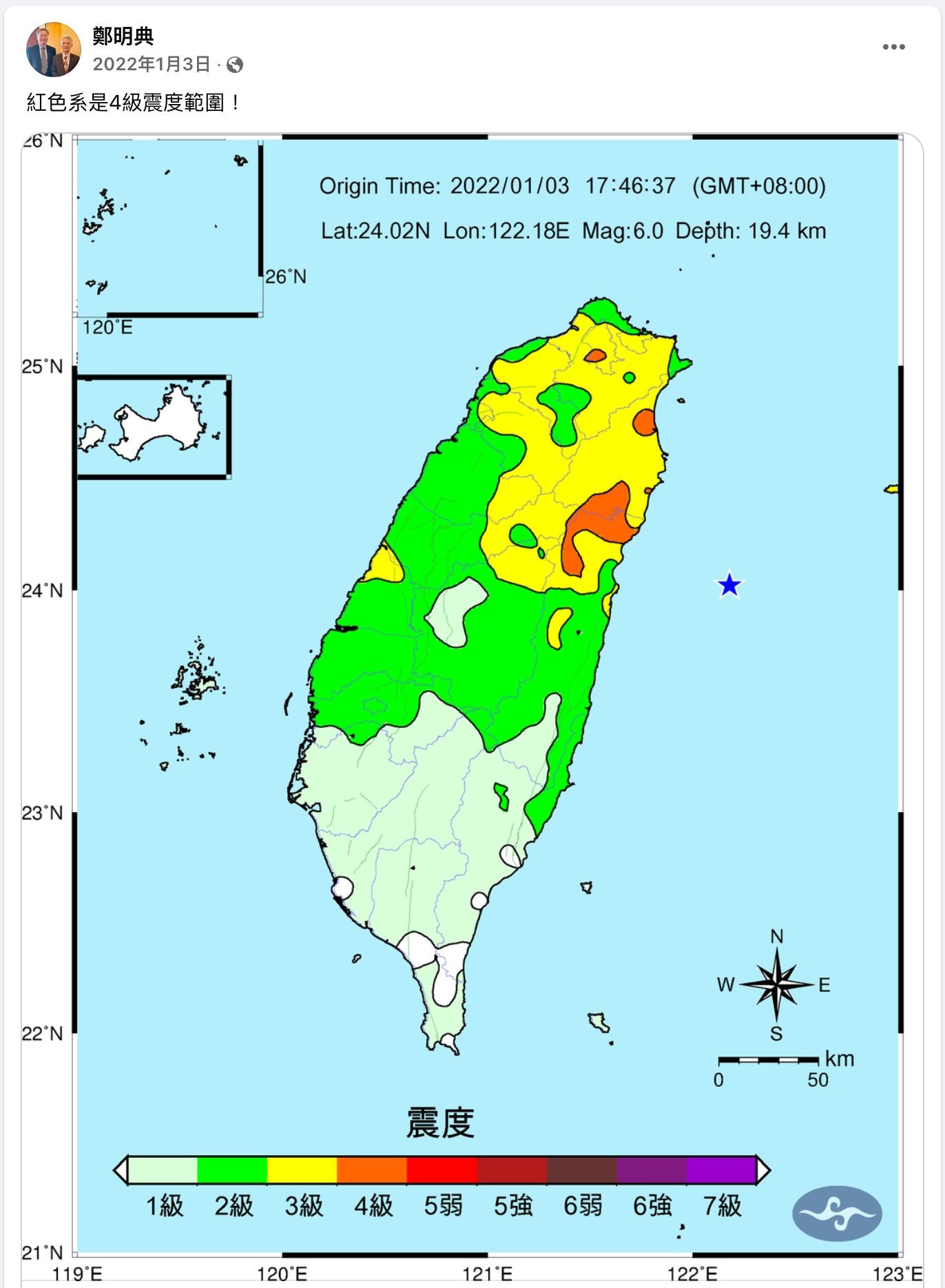 (Image: Detailed intensity map — source: Cheng Ming-Dean's Facebook)
So it turns out there's quite a bit going on behind that piercing alert tone.
Hopefully you feel a little better now — it's not that you're hopelessly forgotten by the system, it's probably just a settings issue.
If you usually do receive alerts, it's still worth opening your notification settings to double-check. And next time a friend complains they didn't get one, you'll know exactly how to help them troubleshoot.
|
|
Bonny I'm Bonny — there are a few conflicting souls living inside me. I love reading quietly on my own, but every now and then I shut myself in my room and crank up heavy metal at full volume. I'm obsessed with productivity tools and chasing personal efficiency, but I'm also hopelessly addicted to teamwork — I can't quit the thrill of chasing dreams alongside good people. I care about social issues and international politics. The way I see it, instead of fearing disasters, we're better off understanding them and preparing in advance. I take these columns seriously, because I believe that as long as I keep writing, there's a chance to save more lives. ❤️ |