What's the Purpose of the "Evacuation Map" Every Neighborhood Has? And Where Can You Download It?
An "evacuation map" is a simplified map produced by local government for a specific area. It shows the key shelter facilities in the area, along with the locations and contact details of disaster response units.
Take the evacuation map for Zhongzhuang Borough (中庄里), Zhongshan District, Taipei City as an example:

Alongside the streets, the map lists:
- Disaster Reporting Units: contact numbers and contact persons
- Evacuation Shelters: names, addresses, and capacity
The locations of these units and shelters are clearly marked on the map as well.
We recommend downloading this kind of evacuation map and sharing it with your family. Discuss together to plan an evacuation route for when disaster strikes, then print the map and draw the route on it. That way, when something happens, everyone in the household can respond and act quickly.
Today we'll walk you through where to download these maps and how to print them.
The National Fire Agency (under Taiwan's Ministry of the Interior) has actually compiled evacuation maps for all of Taiwan on its website — but after some hands-on testing, Bonny found that around 30% of the links are broken. That's understandable, given how many external sites need to be maintained.
So we'll also show you how to use Google to find the evacuation map for the village or borough where you live.
1. Looking Up Your Village/Borough
If you've recently moved, you may not yet be familiar with your new neighborhood. So what do you do if you don't even know which borough you live in?
You can look it up at "Find 3+3 Postal Code" (找找3+3郵遞區號):
- Website: Find 3+3 Postal Code
- URL: https://twzipcode.com/
- Type: Free (contains web ads)
- Language: Traditional Chinese
On the site, simply enter your address and click "Find" (找找):

You'll see the name of your village/borough straight away:

2. Use the National Fire Agency Website to Find a Quick Link to the "Evacuation Map"
The Fire Agency is the most convenient place to start — try here first.
- Website: National Fire Agency Global Information Network — Simplified Evacuation Map
- URL: link
- Language: Traditional Chinese
You'll see quick links for disaster prevention maps across northern, central, southern, and eastern Taiwan. Click any city or county and you'll be taken to the evacuation map page hosted by that local government.

If a link turns out to be broken, switch to Google.
3. Searching via Google
In Google's search bar, type "[County/City] [District] [Borough] evacuation map" (e.g. 台北市 中山區中庄里 避難地圖). Usually the first or second result will be the map you're looking for.

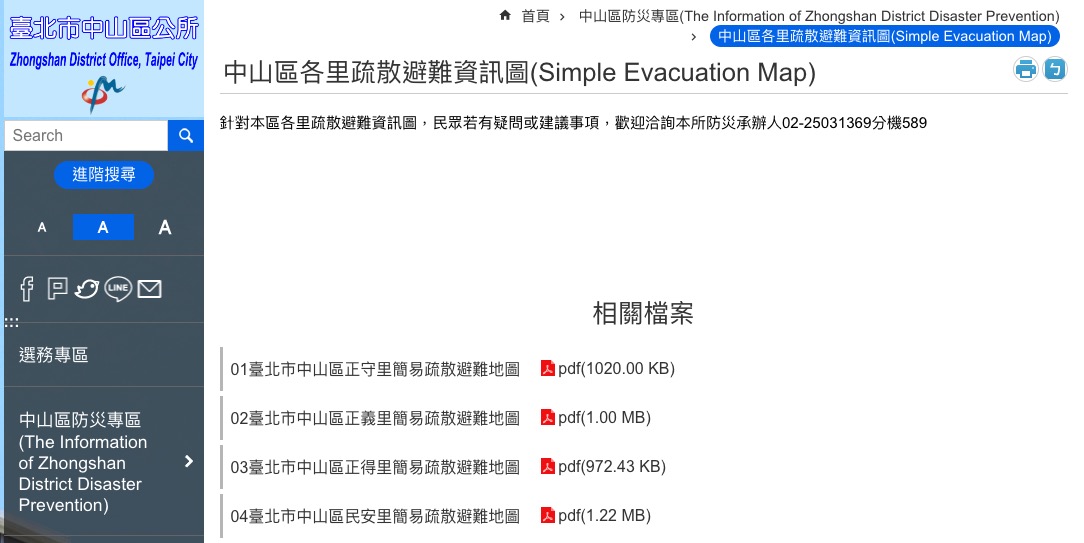
Click through to reach the download page for each borough's evacuation map in Zhongshan District.
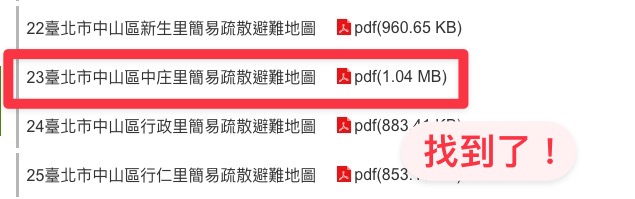
A quick scroll, and you'll find the file:
4. How to View and Print Digital Maps (Using New Taipei City as an Example)
If you live in New Taipei City, you'll notice the maps aren't provided as a downloadable document for each borough like in other cities — they're presented as an interactive digital map instead. So how do you find the map for your specific borough?
When you first open the map, it looks like this:

Look at the top-right corner for "Borough" (里別), and use the dropdown to select where you live.

The map will jump to the correct location and display disaster prevention information for your borough:

Adjust the map to a suitable size, then click "Print" in the top-right corner. You can either save it as a PDF or send it straight to the printer. You may need to adjust paper orientation, size, and scaling. Because printers typically leave a margin, it's a good idea to manually adjust the margins as well, so that important information doesn't get cut off.

Once you're done, click "Save" or "Print" — and you're set.
While helping friends and family track down their evacuation maps, Bonny noticed that some areas don't appear to have uploaded one. If you can't find a map for your village or borough either, try asking your village/borough chief, or look it up via the 消防防災e點通 (Fire & Disaster Prevention e-Service) app.
We'll publish a separate tutorial on the 消防防災e點通 app soon — stay tuned!
|
|
Bonny I'm Bonny — there's a whole cast of conflicting souls living inside me. I love reading quietly on my own, but every once in a while I'll lock myself in my room and crank up the metal music. I'm hooked on productivity tools and chasing personal efficiency, yet I'm just as addicted to teamwork — I can't quit the thrill of chasing dreams alongside other people. I care about social issues and international politics, and I believe that rather than fearing disasters, we should learn about them and prepare in advance. I take these columns seriously, because I believe that as long as I keep writing, there's a chance to save more lives. ❤️ |